



BauCaD BauWolke BauCaD BauWolke from the BauCaD family by Kempter GmbH focuses on the simple, fast and reliable conversion of point clouds into 2D/3D models. With its unique 2/3D layer concept, BauWolke combines all the advantages of 2D and 3D drawing methods and efficiently integrates them into planning work with point clouds. BauWolke now offers a holistic approach for converting point clouds directly into finished 3D models, starting from simple and precise 2D building planning, without any additional effort. A wealth of tools is available for this purpose, allowing you to first divide the building into layers/floors and then define it piece by piece. The easy operation enables planners to quickly, precisely and error-free draw all relevant building components, such as walls, windows, roofs, stairs, chimneys and much more. The continuous development of the programme takes place in close cooperation with customers. BauWolke is currently available from AutoCAD 2023 and BricsCAD V25 onwards. Further GrundCAD programmes available on request. To use BauCaD BauWolke, you also need a BricsCAD Pro licence (or BIM, Mechanical, Ultimate). If you do not have one, you can order the BricsCAD Pro licence as a separate product at the same time. An online connection is required when starting the programme. If this is not possible for you, we are happy to offer you a dongle on request. BauWolke offers you Simultaneous 2D building planning and 3D model creation from the point cloud Specialised in point cloud processing Fast workflow with high accuracy Situational point cloud control Suitable for any point cloud quality Intuitive and well-thought-out handling with maximum control and useful automatisms Functions in BauWolke Project organisation Drawing management 2/3D layer concept Automatic layer organisation, layer control and layout Various section routines, such as higher/lower, layer section and eraser Section control commands for live adjustment of sections Various view control commands for point cloud processing Transformation of the point cloud to the origin and back-transformation of the entire drawing to geo-coordinates Point cloud alignment Floor/layer creation and management Commands for 3D tracing Roof planning from the point cloud Roof timber drawing commands Measuring and pick point commands Creation of exterior and interior walls directly from the point cloud Conversion of CAD objects to walls Drawing windows and doors from the point cloud Roof windows Special routines for unusual openings Various editing commands for walls Detailed opening definition for doors, windows, etc. Control and editing routines for adjusting openings Free and automatic ceiling creation Stair planning directly from the point cloud Facade creation Architectural functions Timber and steel construction from BauCaD Various commands for easy creation of sections and views Wall and ceiling slots Calculation of living area Room volume Automatic wall hatching Manual and automatic building dimensioning Various building component commands, such as railings, floor slabs, balconies, bay windows and much more Individual and automatic views Planning and representation of the terrain model 2D and 3D symbol library for interior fittings Symbol library for fire protection and electrical Terrain model Automatic plan layouts for structural plan, building application plan, working plan, 3D representation Material assignment Rendering Walkthrough/camera tours through point cloud or model Shadow path camera Sun path setting Various volume editing commands


Professional CAD software developed specifically for civil engineers BauCaD Civil Engineer is your comprehensive solution for structural analysis and optimisation in construction. Our software has been specially developed for civil engineers to help you analyse, design, and optimise complex structures. Core competencies of the software: Reinforcement planning, timber construction, and steel construction form the core of our civil engineering CAD solution, but you also have access to over 2,500 pre-prepared routines. In addition to simple and direct commands, you gain access to powerful functions to accelerate your daily work. With a wide range of powerful tools and features, BauCaD Civil Engineer supports you in implementing your projects more efficiently and successfully. Main features in detail:🔧 Structural analysis Use advanced analysis tools to calculate and optimise the loads and stresses on your structures. 🏗️ Structural design Design robust and efficient structures for buildings, bridges, towers, and other constructions with the help of powerful planning tools. ⚖️ Load case calculation Carry out comprehensive load case calculations to ensure the safety and stability of your structures under various operating conditions. 🔬 Finite Element Analysis (FEA) Use FEA technology to virtually analyse and optimise complex structures before they are built. 🔗 Interoperability Benefit from the seamless integration of BauCaD Civil Engineer with other CAD and BIM software solutions to ensure a smooth workflow. 📊 Custom report generation Create detailed reports and documentation of your analysis results to share with clients, colleagues, and other stakeholders. System requirements: BauCaD Civil Engineer requires a base CAD. We are currently compatible with: BricsCAD AutoCAD from version V18 onwards Your benefits at a glance: ✓ Over 2,500 pre-prepared routines for maximum efficiency ✓ Specialised in reinforcement planning, timber construction, and steel construction ✓ Advanced FEA technology for precise analyses ✓ Comprehensive load case calculations for maximum safety ✓ Seamless integration into existing CAD workflows ✓ Professional report generation for project documentation ✓ Compatibility with leading CAD platforms Ideal for: Civil engineers and structural engineers Design offices and planning companies Construction companies with in-house planning Engineering offices for structural design Educational institutions in the construction sector Revolutionise your structural design with BauCaD Civil Engineer – the professional solution for structural analysis and optimisation!

Single User Licence CADPower is a domain-neutral productivity tool for .dwg CAD users, offering over 400 Lisp routines and tools for common tasks. It increases the efficiency of AutoCAD and BricsCAD users. Its development is entirely based on feedback from real users. Increased efficiency for users, CAD will never be boring again CADPower stands for automation. Our goal is to increase users’ efficiency and make CAD editing interesting rather than monotonous. As long as your CAD work is creative, it is interesting. When it becomes repetitive, it is boring. CADPower aims to automate repetitive tasks in creative ways, so you can focus on more interesting tasks related to your design, instead of spending all your time working with CAD commands. Many of the tools in CADPower are AI-driven and work with the most common anticipatory behaviours of CAD users. Polyline, blocks, text, attributes, system tools, annotations, conversion: versatile range of functions CADPower is a comprehensive collection of tools for general productivity enhancement. There are categorised tools in the areas of polylines, blocks, annotations, text, conversion, system tools, blocks and attributes, covering the full spectrum of operations you need during your CAD design. Each tool is based on feedback and practical requirements from users worldwide. In addition, many tools offer multiple options and variants, making them flexible for use in different situations. Numerous CADPower tools also support script-driven automatic processing. Quantity take-off, management of attached data, activate simple parts database in dwg CADPower transforms your drawing into a tool for quantity take-off as well as parts and quantity lists (BOM/BOQ). You can also add data to each unit and turn your drawing into a database. You can also export these as Excel/CSV files, thus achieving a high level of data exchange capability. ERP exports and all types of Excel import/export operations are easily possible with CADPower. CADPower is a domain-neutral productivity tool for all .dwg CAD users. It offers over 400 Lisp routines and tools for frequently required tasks to increase the productivity of AutoCAD, BricsCAD, ZWCAD and aRES Commander users. Its development is entirely based on feedback from real users and it is now used by over 2,000 organisations worldwide. Advanced polyline editing Drawing, construction and conversion tools Text processing Enhanced selection settings Query and statistics tools Drawing editing tools Turn your DWG file into a database Advanced entity data tools Drawing clean-up / QA tools Import/export tools Tools for quantity and parts lists (BOM/BOQ) Annotation tools Powerful block and attribute management Quick commands for shortcuts Various additional tools Fully compatible with batch script processing. With the support and maintenance contract, you receive support by E-MAIL as well as the next CADPower version free of charge as soon as it becomes available. The support and maintenance contract is automatically extended for another year unless cancelled 6 weeks before expiry. From the second year onwards, the cost for the support and maintenance contract is €99.80 net.

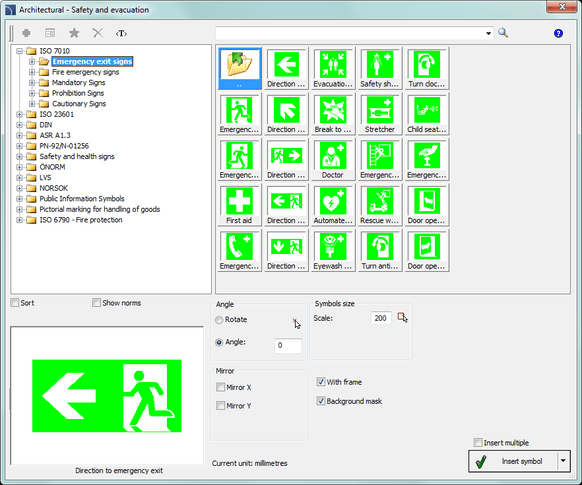
Single-user Purchase Licence CADprofi Architectural assists the user both in drawing floor plans and designing facades, allows the drawing of walls, inserting doors and windows, architectural dimensioning and labelling, as well as the use of interior design objects. A special feature of the program is the creation of escape and rescue plans. CADprofi Architectural is available as a single module or as part of the CADprofi Suite package, in which all 4 disciplines are offered with a 50% discount. Main Features Drawing of single- and multi-layer walls with the option to define both the material and wall thickness for each layer. Drawing of walls with an offset (distance) to selected points or other objects. Parametric library for building elements (windows, doors, openings, garage doors) with automatic recognition of wall thickness. Views for floor plan, section, elevation. All dimensions and properties of the building elements are freely definable. Dynamic determination of the insertion direction of doors facilitates correct positioning. Automatic room definition and labelling with calculation of areas. Design of stairs with definition of dimensions and number of steps. Various stair elements are available. Insertion of standard roofs with calculation of roof area, roof pitch and roof height. Architectural dimensioning suitable for the building project. The program allows the adaptation of existing styles and changing of units independently of the drawing unit. A special feature of the program is the ability to automatically convert a "normal dimension" into architectural dimensioning. Extensive library for interior furnishings: furniture, office furniture, technical devices for household/entertainment, sanitary equipment, plants, etc. Height point dimensioning with automatic entry of the height for the specified points. Architectural symbols: room labels, breakthroughs, openings, topographical symbols, terrain slope, arrows, etc. Drawing and editing of escape and rescue routes. Symbol library with standard symbols for fire protection, disaster protection and safety, public information symbols and more. Intuitive design focused on the wishes and needs of planners. Free choice of planning unit – metric or imperial. Tools for the complete description of project details. Automatic object numbering. Fast product search in the databases. Access to product libraries of well-known manufacturers. Option to expand the content of the symbol libraries and parametric object libraries with your own symbols and objects. Automatic layer management and ready-made plot style tables enable suitable line colours and thicknesses to be obtained on printouts. Creation of user lists with "favourites" (symbols and objects) to tailor work to your own preferences and habits. Option to create your own translations of program content or commands. Intelligent insertion of objects or their connection with other objects using "one-click" technology. Intelligent commands enable quick editing of symbols and objects directly in the drawing. Creation of any diagrams, logical, functional and technological block diagrams. Automatic parts list function with printout or export to PDF, RTF(DOC), XLS, XLM, CSV, HTML and others. Automatic legends for drawn diagrams. Context-sensitive help with many illustrations and example videos that clearly explain how to use the program. Online program updates. Each newly purchased CADprofi licence includes a free one-year Premium Package (software maintenance), which allows you to benefit from many additional advantages. The package can be extended for a fee at the regular price, at the latest before its expiry. You can extend the Premium Package at any time, as the extension is for a further 12 months, always calculated from the expiry date, not from the purchase date. PREMIUM PACKAGE (SOFTWARE MAINTENANCE) 1. As part of the software maintenance, the user is entitled to: Download and free use of the available manufacturer libraries from the CADprofi internet server (for CADprofi licences only). Free download of current program versions from the CADprofi internet server (upgrade), which include content extensions (additional symbol libraries, standards, etc.), functional enhancements as well as adaptations to new versions of the CAD base programs. Free technical support (hotline). Installation of a single-user version on another computer of the same user (e.g. home PC) on the condition that only one of these installations is used at a time. Use of all previous versions of the programs (downgrade). 2. Duration and renewal of software maintenance: Software maintenance is not renewed automatically. Renewal requires a new order from the customer. Perpetual commercial licences can continue to be used even after the software maintenance has expired. Software maintenance can be extended for a fee immediately before its expiry (does not apply to time-limited licences). The new software maintenance period starts from the date of expiry of the last period and not from the date of the order. A renewal of software maintenance must cover all CADprofi licences on the respective computer (for CP-Symbols licences, an update must be purchased).

Morphcad enables you to create deformation-accurate and detailed models from point clouds with just 11 simple commands. Our intuitive software integrates seamlessly into BricsCAD and enhances your workflow without interruption. Increase your productivity in 2D, 3D and BIM and take advantage of the advanced features of morphcad. morphcad is the application for the architecture industry morphcad offers architects a CAD software that enables precise modelling from point clouds. It allows for accurate surveys, detailed analysis of building structures, efficient renovation and remodelling planning, realistic visualisation for clients, and seamless integration of BIM processes. morphcad simplifies the tasks of architects by providing an accurate and reliable solution to the challenges of planning and implementing construction projects. Construction management and supervision morphcad offers site managers and professionals a CAD software that creates accurate models from point clouds. This enables precise surveys, detailed analysis of construction projects, efficient monitoring of construction progress, improved communication, and seamless BIM integration. morphcad provides an accurate and reliable solution to streamline the challenges of construction management and supervision.Preservation of cultural heritage morphcad offers restorers a CAD software that creates accurate models from point clouds. It enables precise surveys, detailed analysis, virtual reconstruction, and comprehensive documentation of historic buildings. morphcad allows restorers to collaborate effectively with experts and tackle the challenges of heritage conservation.For more information, visit https://morphcad.com

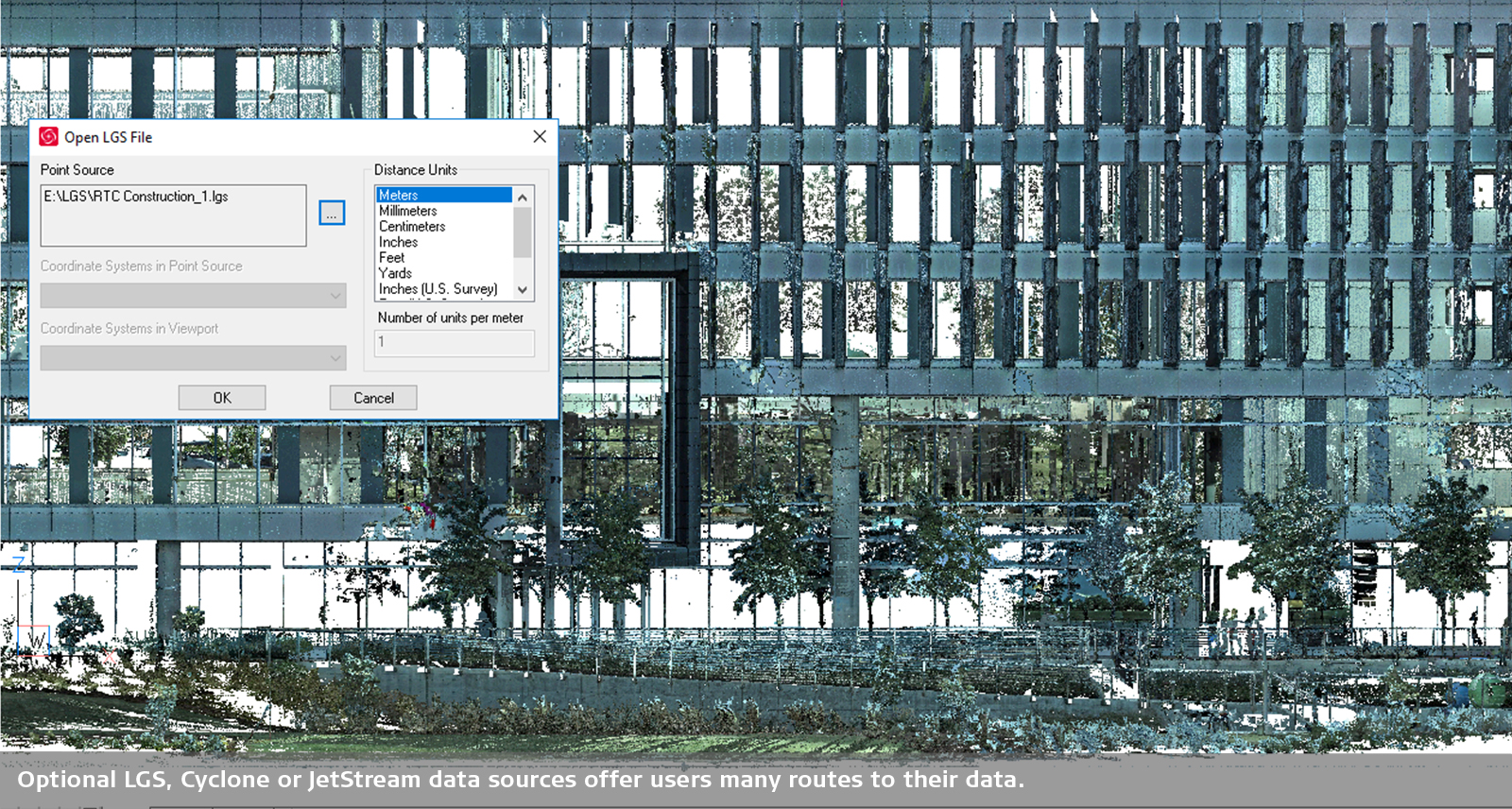
Leica CloudWorx for BricsCAD provides users with a route to start modelling or drafting based on point clouds stored in Leica Cyclone or Leica JetStream directly within BricsCAD. CloudWorx for BricsCAD brings significant time savings to companies of all sizes and enables users to work smarter, not necessarily harder, and to achieve results suitable for professional use. Thanks to intelligent automation with the appropriate tools, the most common workflows become faster and easier. CloudWorx Basic offers simple tools for viewing and working with sections from point cloud data. This allows you to: Import 3D scans and select visual styles Create 2D drawings more quickly Improve surveying workflows Seamless integration Leica CloudWorx integrates seamlessly into BricsCAD, reducing the learning curve when working with point cloud data. In addition to the native tools in BricsCAD, you can access all CloudWorx feature extensions. Simply load a Cyclone or JetStream project or an LGS file and immediately start working on all your projects in BricsCAD. To use CloudWorx, you also need a BricsCAD Pro licence (or BIM, Mechanical, Ultimate). If you do not have one, you can order the BricsCAD Pro licence as a separate product at the same time.

Leica CloudWorx for BricsCAD provides users with a route to start modelling or drafting based on point clouds stored in Leica Cyclone or Leica JetStream directly within BricsCAD. CloudWorx for BricsCAD brings significant time savings to companies of all sizes and enables users to work smarter, not necessarily harder, and to achieve results suitable for professional use. Thanks to intelligent automation with the appropriate tools, the most common workflows become faster and easier. CloudWorx Basic offers simple tools for viewing and working with sections from point cloud data. This allows you to: Import 3D scans and select visual styles Create 2D drawings more quickly Improve surveying workflows Seamless integration Leica CloudWorx integrates seamlessly into BricsCAD, reducing the learning curve when working with point cloud data. In addition to the native tools in BricsCAD, you can access all CloudWorx feature extensions. Simply load a Cyclone or JetStream project or an LGS file and immediately start working on all your projects in BricsCAD. To use CloudWorx, you also need a BricsCAD Pro licence (or BIM, Mechanical, Ultimate). If you do not have one, you can order the BricsCAD Pro licence as a separate product at the same time.

Architecture, Rescue Plans, BKS Update Single-User Purchase Licence CADprofi Architectural supports users both in drawing floor plans and designing facades, allowing the drawing of walls, inserting doors and windows, architectural dimensioning and labelling, as well as the use of interior design objects. A special feature of the programme is the creation of escape and rescue plans. CADprofi Architectural is available as a single module or as part of the CADprofi Suite package, in which all 4 disciplines are offered with a 50% discount. Main Features Drawing of single- and multi-layer walls with the option to define both the material and wall thickness for each layer. Drawing of walls with an offset (distance) to selected points or other objects. Parametric library for building elements (windows, doors, openings, garage doors) with automatic recognition of wall thickness. Views for floor plan, section, elevation. All dimensions and properties of the building elements are freely definable. Dynamic determination of the insertion direction of doors facilitates correct positioning. Automatic room definition and labelling with calculation of areas. Design of stairs with definition of dimensions and number of steps. Various stair elements are available. Insertion of standard roofs with calculation of roof area, roof pitch, and roof height. Architectural dimensioning suitable for the building project. The programme allows the adaptation of existing styles and changing of units independently of the drawing unit. A special feature of the programme is the ability to automatically convert a "normal dimension" into architectural dimensioning. Extensive library for interior furnishings: furniture, office furniture, household/entertainment technical devices, sanitary equipment, plants, etc. Height point dimensioning with automatic entry of the height for the specified points. Architectural symbols: room labels, breakthroughs, openings, topographical symbols, terrain slope, arrows, etc. Drawing and editing of escape and rescue routes. Symbol library with standard symbols for fire protection, disaster protection and safety, public information symbols, and more. Intuitive design focused on the wishes and needs of planners. Free choice of planning unit – metric or imperial. Tools for the complete description of project details. Automatic object numbering. Fast product search in the databases. Access to product libraries of well-known manufacturers. Option to expand the content of symbol libraries and parametric object libraries with your own symbols and objects. Automatic layer management and ready-made plot style tables enable suitable line colours and thicknesses to be obtained on printouts. Creation of user lists with "favourites" (symbols and objects) to tailor work to your own preferences and habits. Option to create your own translations of programme content or commands. Intelligent insertion of objects or their connection with other objects using "one-click" technology. Intelligent commands enable quick editing of symbols and objects directly in the drawing. Creation of any diagrams, logical, functional, and technological block diagrams. Automatic parts list function with printout or export to PDF, RTF(DOC), XLS, XLM, CSV, HTML and others. Automatic legends for drawn diagrams. Context-sensitive help with many illustrations and example videos that clearly explain how to use the programme. Online programme updates. Every newly purchased CADprofi licence includes a free one-year Premium Package (software maintenance), which allows you to benefit from many additional advantages. The package can be extended for a fee at the regular price, at the latest before it expires. You can extend the Premium Package at any time, as the extension is for a further 12 months, always calculated from the expiry date, not from the purchase date. PREMIUM PACKAGE (SOFTWARE MAINTENANCE)1. As part of software maintenance, the user is entitled to: Download and free use of the available manufacturer libraries from the CADprofi internet server (for CADprofi licences only). Free download of current programme versions from the CADprofi internet server (upgrade), which include content extensions (additional symbol libraries, standards, etc.), functional enhancements, as well as adaptations to new versions of the CAD base programmes. Free technical support (hotline). Installation of a single-user version on another computer of the same user (e.g. home PC) on the condition that only one of these installations is used at a time. Use of all previous versions of the programmes (downgrade). 2. Duration and renewal of software maintenance: Software maintenance is not renewed automatically. Renewal requires a new order from the customer. Perpetual commercial licences can continue to be used even after software maintenance has expired. Software maintenance can be extended for a fee immediately before it expires (not applicable to time-limited licences). The new software maintenance period starts from the date the previous period ends, not from the order date. An extension of software maintenance must cover all CADprofi licences on the respective computer (for CP-Symbols licences, an update must be purchased).
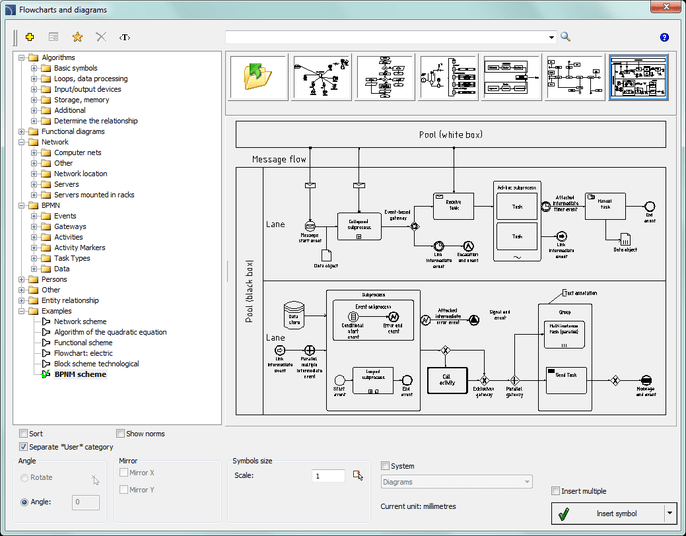
CP-Symbols Series Electrical Single-user purchase licence This series includes standard symbol libraries for use in electrical installation projects. The series consists of 5 libraries. CP-Symbols Electrical - IEC, NFPA CP-Symbols Electrical - Floor Plan CP-Symbols Electrical - Schematic CP-Symbols Electrical - Lighting CP-Symbols - Organigrams and Block Diagrams

CP-Symbols Series HVAC&Piping Update Single-User Perpetual Licence This series includes basic libraries with symbols and objects that are used in projects for domestic and industrial installations. The series consists of 5 libraries. CP-Symbols HVAC & Piping - Basic Symbols CP-Symbols HVAC & Piping - Industrial Symbols CP-Symbols HVAC & Piping - Radiators, Objects CP-Symbols HVAC & Piping - Ventilation CP-Symbols - Organigrams and Block Diagrams