

BauCAD BauWolke
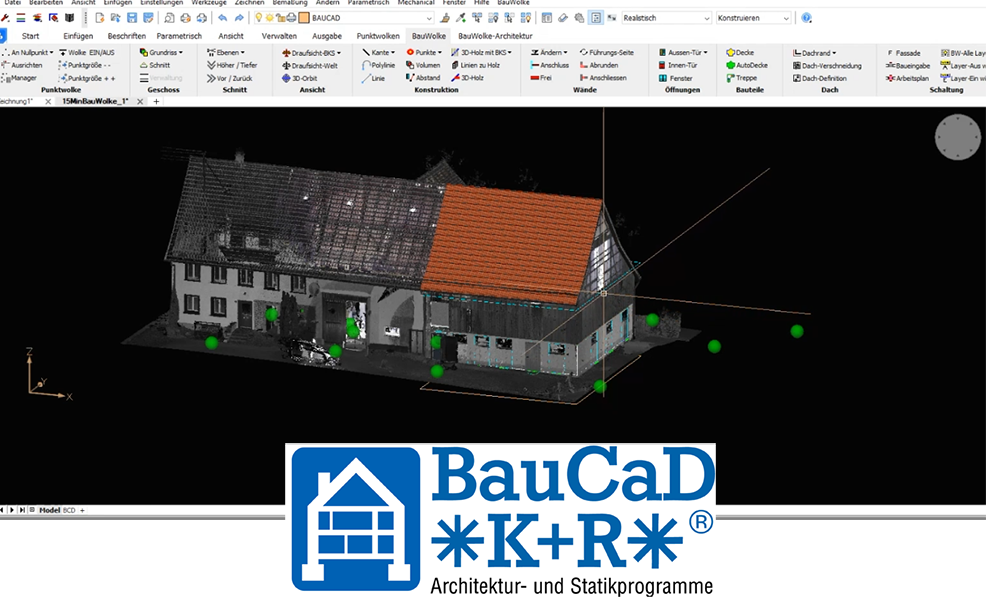
BauCaD BauWolke is the latest product from the BauCaD family by Kempter GmbH and focuses on the simple, fast and reliable conversion of point clouds into 2D/3D models.
With its unique 2/3D plane concept, BauWolke combines all the advantages of 2D and 3D drawing methods and efficiently integrates them into planning work with point clouds.
BauWolke offers a holistic approach for converting point clouds directly into finished 3D models, starting from simple and precise 2D building planning, without any additional effort.
BauWolke offers you
- Simultaneous 2D construction planning and 3D model creation from the point cloud
- Specialised in point cloud processing
- Fast workflow with high accuracy
- Situational point cloud control
- Suitable for any point cloud quality
- Intuitive and well-thought-out handling with maximum control and sensible automation
- Project organisation
- Drawing management
- 2D/3D layer concept
- Automatic layer organisation, layer control and layout
- Various section routines, such as raise/lower, layer section and eraser
- Section control commands for live adjustment of sections
- Various view control commands for point cloud processing
- Transformation of the point cloud to the origin and reverse transformation of the entire drawing to the geocoordinates
- Point cloud alignment
- Storey/layer creation and management
- Commands for 3D tracing
- Roof planning from the point cloud
- Dachbalken-Zeichenbefehle
- Mess- und Punktwahlbefehle
- Erstellung von Außen- und Innenwänden direkt aus der Punktwolke
- Umwandlung von CAD-Objekten in Wände
- Zeichnen von Fenstern und Türen aus der Punktwolke
- Dachfenster
- Spezielle Routinen für ungewöhnliche Öffnungen
- Verschiedene Wandbearbeitungsbefehle
- Detaillierte Öffnungsdefinition für Türen, Fenster, …
- Steuerungs- und Bearbeitungsroutinen zur Anpassung von Öffnungen
- Freie und automatische Deckenerstellung
- Treppenplanung direkt aus der Punktwolke
- Fassadenerstellung
- Timber and steel construction from BauCaD
- Various commands for easy creation of sections and views
- Wall and ceiling chases
- Calculation of living area
- Room volume
- Automatic wall hatching
- Manual and automatic building dimensioning
- Various building component commands, such as railings, floor slabs, balconies, bay windows and much more
- Individual and automatic views
- Planning and presentation of the terrain model
- 2D and 3D symbol library for interior design
- Symbol library for fire protection and electrical
- Terrain model
- Automatic plan layouts for structural plan, building application plan, working plan, 3D representation
- Material assignment
- Rendering
- Walkthrough/camera movements through point cloud or model
- Shadow path camera
- Sun path setting
- Various volume editing commands
The BauCaD Maintenance Contract – always the latest version
As part of the maintenance contract, you will always receive the latest version of BauCaD at no additional cost, in addition to all the services included in the support contract, ensuring you are always up to date.
In addition to support, you always have access to the most current version of the programme via the BauCaD website or directly through the daily update. This enables you to benefit from all developments, suggestions, and implementations of customer requests, as well as normative changes, immediately after completion without delay or update costs.
With the BauCaD Support Contract you receive
Access to unlimited support directly from the developer! Unlimited and expert telephone support... The hotline offers you competent assistance with the complex issues that can arise when working with CAD.
Whether BauCaD, BricsCAD or AutoCAD --> you will receive comprehensive assistance!
- Programme repair after system crash or similar issues
- Searching for and restoring backup files of damaged drawings
- Transfer of user settings and configuration of the user interface
- Finding and installing the correct plotter driver and configuring print settings in the programme
- Importing external drawings for further processing, and much more
Tips and Tricks
- Tips and tricks for programme handling, system settings, hardware components, accessories, and aids.
- Optimisation of command sequences in BauCaD and BricsCAD
- Handling and making use of new programme features in BauCaD and BricsCAD
- CAD-specific settings in the operating system
- System requirements for computers, monitors, printers, etc.
- Information about additional programmes and tools, such as visualisation programmes, PDF creators, PLT viewers, object enablers, BIM, etc.

